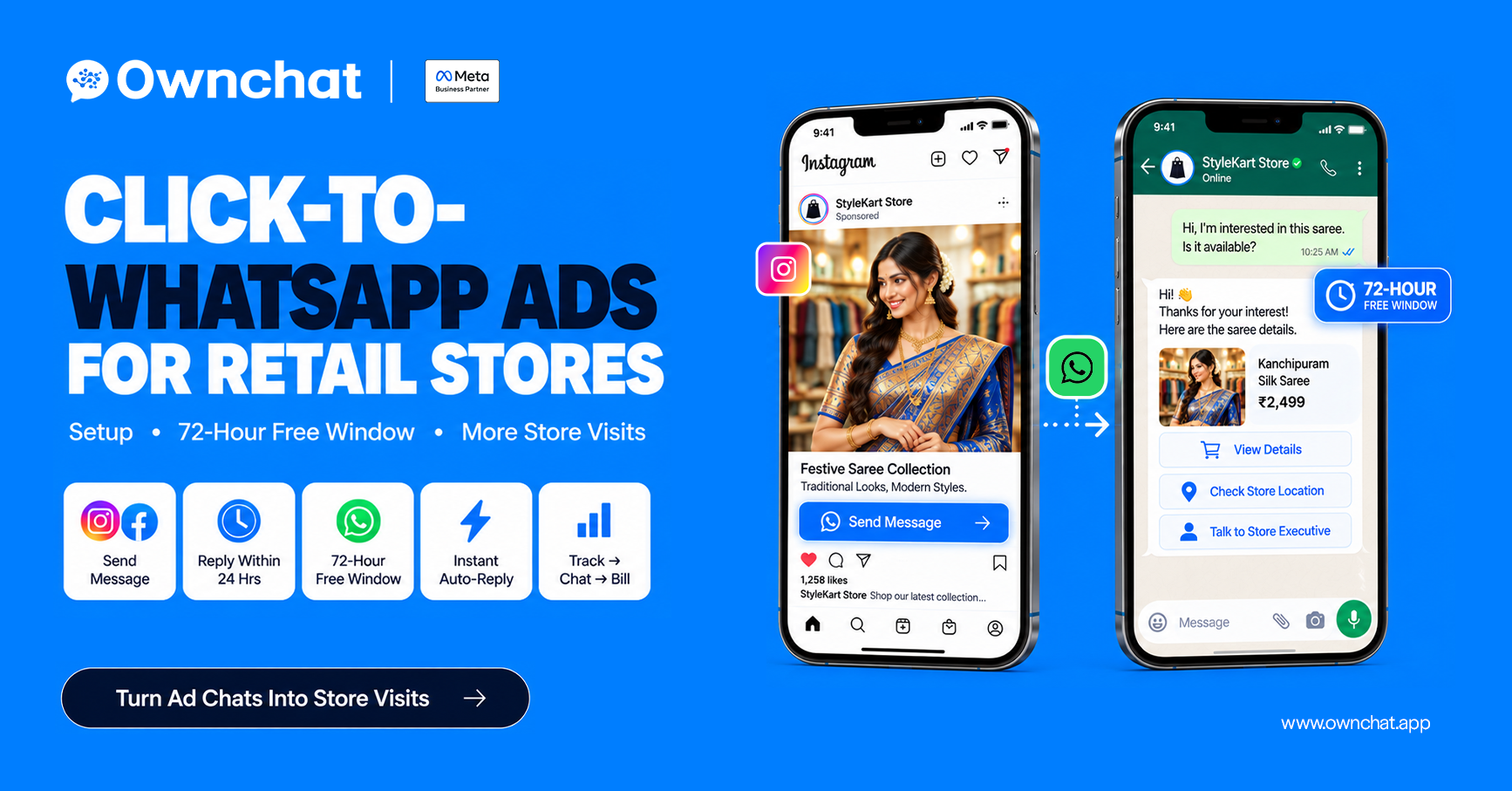
Quick answer: Click-to-WhatsApp (CTWA) ads are Facebook and Instagram ads with a "Send message" button that opens a WhatsApp chat with your store. When a customer messages you from the ad and you reply within 24 hours, a 72-hour free entry-point window opens, so all your messages in that window are free. Reply fast, qualify, and invite them to the store.
Key takeaways
- CTWA ads start a conversation, not just a website visit — ideal for fashion questions.
- The 72-hour free window starts only when you reply within the 24-hour customer-service window.
- Speed of reply decides results; automate the first response.
- Track every chat to a bill to know which ads truly pay.
In this guide
- What are click-to-WhatsApp ads?
- How does the 72-hour free window work?
- How do you set up a CTWA ad? (7 steps)
- What should you reply when a customer messages?
- What targeting and budget work for stores?
- How do you measure CTWA results?
- FAQs
What are click-to-WhatsApp ads?
Ads you create in Meta Ads Manager (or boost from your Page/Instagram) that use WhatsApp as the destination. The customer taps the button, WhatsApp opens with a pre-filled message like "Hi, I want to see the Deepavali collection", and they send it to you.
Why they suit clothing stores: shoppers want to ask about colour, size, price and availability before visiting. A chat answers that in minutes and builds a relationship you can continue.
How does the 72-hour free window work?
| WIndow | Starts When | What's free | Duration |
| Customer-service window | Customer sends you a message | Service replies (free since 1 Nov 2024); utility templates | 24 hours from their last message |
| Free entry-point window | Customer messages from a CTWA ad or Facebook Page CTA and you reply within 24 hours | All messages, including marketing templates | 72 hours from your reply |
Important details:
- If you don't reply within 24 hours, the 72-hour window is not opened.
- The customer must message you from the WhatsApp mobile app (Android or iPhone) — Meta says desktop and web apps aren't supported for this window.
- After 72 hours, standard per-message pricing applies again.
- Rules can change — check Meta's pricing documentation before planning budgets.
How do you set up a click-to-WhatsApp ad?
- Connect your WhatsApp Business number to your Facebook Page and Instagram account in Meta Business settings.
- In Ads Manager, choose the Engagement (or Sales) objective and select Messaging apps → WhatsApp as the conversion location.
- Set location targeting to a radius around your store (e.g. 5–10 km) and relevant ages.
- Choose creative: a short Reel or carousel of new arrivals with price anchors.
- Write a pre-filled message that tags the source, e.g. "Hi! I saw the Silk Reel ad (DV-SILK)".
- Set up an automatic first reply with quick-reply buttons (Price list / Book trial / Store location).
- Launch with a small budget, review daily, and scale the best-performing creative.
What should you reply when a customer messages from an ad?
Reply 1 — instant (automated)
Hi 👋 Welcome to Sri Lakshmi Silks! Thanks for checking our Deepavali collection. What are you shopping for? [Sarees] [Kids wear] [Menswear]
Reply 2 — after they choose
Here are 6 bestsellers under ₹5,000. Want us to keep one ready for a trial this weekend?
Reply 3 — close
Done! Your trial is booked for Saturday, 4 PM. 📍 Store location: [map link]. Show this chat at the counter for a free fall & pico.
Then ask permission for future updates so you can message them after the window ends.
What targeting and budget work for local stores?
| Setting | Recommendation for a single store |
| Radius | 5–10 km (larger for destination silk stores) |
| Audience | Broad within radius + lookalike of existing customers |
| Creative | Reels of real products with prices; 3–4 variations |
| Starting budget | Small daily test, then increase on the ad with the lowest cost per bill |
| Timing | Start 3–4 weeks before the festival; peak in the final two weekends |
How do you measure click-to-WhatsApp ad results?
Don't stop at "cost per message". Track:
- Cost per conversation (from Ads Manager)
- Qualified chats (asked about product/price)
- Store visits or bookings
- Bills matched to the chat phone number
- Revenue per ₹1 ad spend
The method is covered in how to measure WhatsApp marketing ROI with POS data.
How OwnChat helps
OwnChat sends the instant first reply to CTWA chats, tags each lead with the ad source, routes chats to the right staff, and matches bills back to ads. Messages sent in the 72-hour window are free from Meta; platform fees still apply.
Related: WhatsApp Business app vs API · Instagram comment-to-DM automation · Diwali marketing ideas for clothing stores · Book a free 15-minute audit
Frequently asked questions
1.What is a click-to-WhatsApp ad?
A Facebook or Instagram ad whose button opens a WhatsApp chat with your business instead of a website.
2.Are messages free after a click-to-WhatsApp ad?
Yes, for 72 hours — if you reply within 24 hours of the customer's message. After that, standard pricing applies.
3.Do I need the WhatsApp Business API for CTWA ads?
No, the Business app also works. The API adds automation, team inbox and tracking, which matter at volume.
4.How much should a store spend on CTWA ads?
Start small, measure cost per bill rather than cost per chat, and scale the best creative in the final weeks before the festival.
5.Can I send offers after the 72 hours end?
Yes, with approved marketing templates to customers who opted in, charged at standard rates.
6.Why are my CTWA ads getting chats but no sales?
Common reasons are slow replies, no clear next step, or wide targeting. Reply instantly and offer a trial booking or store directions.
Sources (checked 12 October 2026)
.png)


