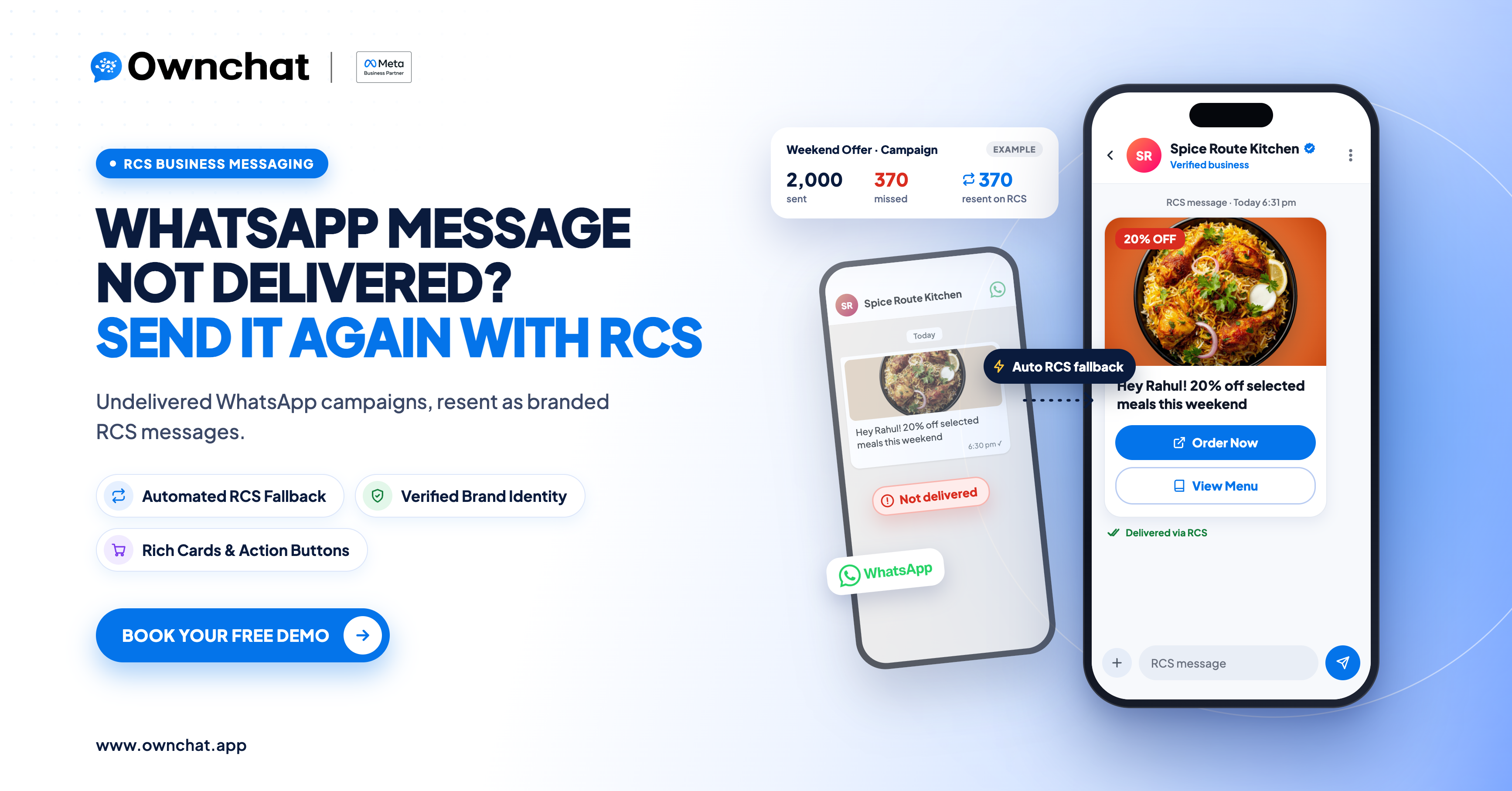
Quick answer: Some WhatsApp campaign messages never reach customers, because the customer isn't on WhatsApp, their phone is offline, or WhatsApp limits how many marketing messages a person receives. Ownchat's automated RCS fallback finds those undelivered messages and sends the same offer again as a branded RCS message in the customer's default messaging app, so more customers see your campaign.
Key takeaways
- In a big campaign, some WhatsApp messages always fail or stay undelivered.
- RCS fallback resends the offer only to customers who didn't get the WhatsApp message.
- RCS shows your brand name, images and buttons, unlike plain SMS.
- Fallback can't help with wrong phone numbers. Clean your list first.
The Messages You Paid For but Customers Never Saw
Imagine sending a weekend offer to 2,000 customers. On Monday you open the delivery report:
| Status | Messages |
|---|---|
| Delivered | 1,630 |
| Failed | 120 |
| Not delivered in time | 250 |
| Missed the offer | 370 |
Example campaign. Your numbers will be different.
That's 370 customers who never saw your offer. They can't order from a message they didn't receive.
Your team could export the failed list and send a separate campaign, but that's manual work, and by then the weekend offer may be over. RCS fallback does it automatically.
Why Do WhatsApp Messages Fail?
Before setting up fallback, it helps to know which failures RCS can fix:
| Why the WhatsApp message didn't arrive | Will RCS fallback help? |
|---|---|
| The customer doesn't use WhatsApp on that number | ✅ Yes |
| The phone was offline, and the message wasn't delivered in time | ✅ Yes, if the phone supports RCS |
| WhatsApp limited marketing messages to that customer (error 131049) | ✅ Yes |
| The phone number is wrong or doesn't exist | ❌ No. Fix your contact list |
| The customer opted out of your messages | ❌ No. Respect their choice on every channel |
To reduce WhatsApp failures in the first place, read how to send bulk WhatsApp messages without getting banned.
How Ownchat's RCS Fallback Works
Step 1: Send Your WhatsApp Campaign
Create and send your WhatsApp campaign in Ownchat as usual. For example, a restaurant sends:
"Your weekend favourite is back! Enjoy 20% off selected meals this weekend. Tap below to explore the menu."
Step 2: Ownchat Finds the Messages That Didn't Arrive
Ownchat watches the delivery status of every message. A message moves to fallback when:
- WhatsApp reports a failure, or
- It's still undelivered after the waiting time you set [confirm: default and range of the waiting period]
Your team doesn't need to go through delivery reports by hand.
Step 3: The Customer Gets the Offer on RCS
Those customers receive the same offer as an RCS message in their phone's default messaging app, such as Google Messages:
[Verified · Spice Route Kitchen] "Hey Rahul! Your weekend treat is waiting. Enjoy 20% off selected meals before Sunday midnight." [Order Now] [View Menu]
The message shows your verified brand name and logo, an image and tap-to-act buttons. The customer doesn't need to install anything.

Will a customer get the same offer twice? [confirm: how Ownchat avoids sending RCS if the WhatsApp message is delivered late]
Why RCS and Not Just SMS?
SMS reaches almost every phone, but it's plain text. A promotion that looked great on WhatsApp with a photo and a button turns into a line of text and a link.
RCS keeps most of that experience: your brand name, images, product cards and buttons like Order Now or Book. That's why it's a better fallback for marketing campaigns.
New to RCS? Read our guide to RCS messaging in India for how it works, who supports it and how it compares with SMS and WhatsApp.
Good to Know Before You Start
- Phone support: RCS works on most Android phones through Google Messages. Jio has also started enabling RCS business messaging on iPhones. Phones without RCS can't receive the fallback message. [confirm: whether Ownchat supports a further SMS fallback]
- Cost: RCS messages are charged separately from WhatsApp. [confirm: Ownchat RCS rate or link to pricing]
- SMS fallback needs DLT: if you also send SMS, your headers and templates must be DLT registered. See DLT registration for SMS in India.
- Consent still applies: send fallback messages only to customers who agreed to hear from you.
How to Set Up RCS in Ownchat
- Go to Settings → RCS Channel.
- Complete Google Verified Sender onboarding through our RCS partner, Karix: business name, logo, description and contact details.
- Wait for Google and operator approval. This can take a few days, and campaigns can't be sent before approval.
- Turn on WhatsApp-to-RCS fallback for your campaign [confirm: where fallback is switched on and the button name].
- Send a test campaign to your own team's numbers before the real one.
Which Businesses Benefit Most?
| Business | Example |
|---|---|
| Restaurants | A weekend combo offer still reaches customers whose WhatsApp didn't deliver |
| Retail and fashion | A new collection reaches more customers, with product images intact |
| D2C brands | A launch or sale message gets a second delivery path |
| Clinics and salons | An appointment reminder reaches customers with a Book button |
Frequently Asked Questions
What is RCS fallback?
It's an automatic second attempt. If a WhatsApp campaign message fails or isn't delivered in time, Ownchat sends the same offer as an RCS message.
Does RCS fallback work for every customer?
No. It works only for customers whose phones support RCS. It also can't help when the phone number is wrong.
Do customers need to install an app to receive RCS?
No. RCS messages arrive in the phone's default messaging app, such as Google Messages.
Is RCS the same as SMS?
No. SMS is plain text. RCS adds your verified brand name, images, product cards and buttons.
Can I send RCS campaigns without WhatsApp?
Yes. Ownchat also lets you send standalone RCS campaigns, such as product carousels and booking reminders.
How long does RCS setup take?
The setup form takes a short time, but Google and operator verification can take a few days. Plan before your campaign date.
Don't Let a Failed Message Cost You a Sale
Every campaign has messages that don't arrive. With Ownchat's RCS fallback, those customers get a second chance to see your offer, in a rich, branded format, without extra work from your team.
Want to see RCS fallback on your own campaign? Book a free 15-minute demo.