Quick answer: With Ownchat, salon clients book on WhatsApp by tapping Book and choosing a service, stylist and time in a short form inside the chat. Ownchat sends the confirmation and reminders automatically, and a "we miss you" message when it's time for their next visit. Anything special, like a bridal enquiry, goes to your team's shared inbox.
9:40 pm, a Monday.
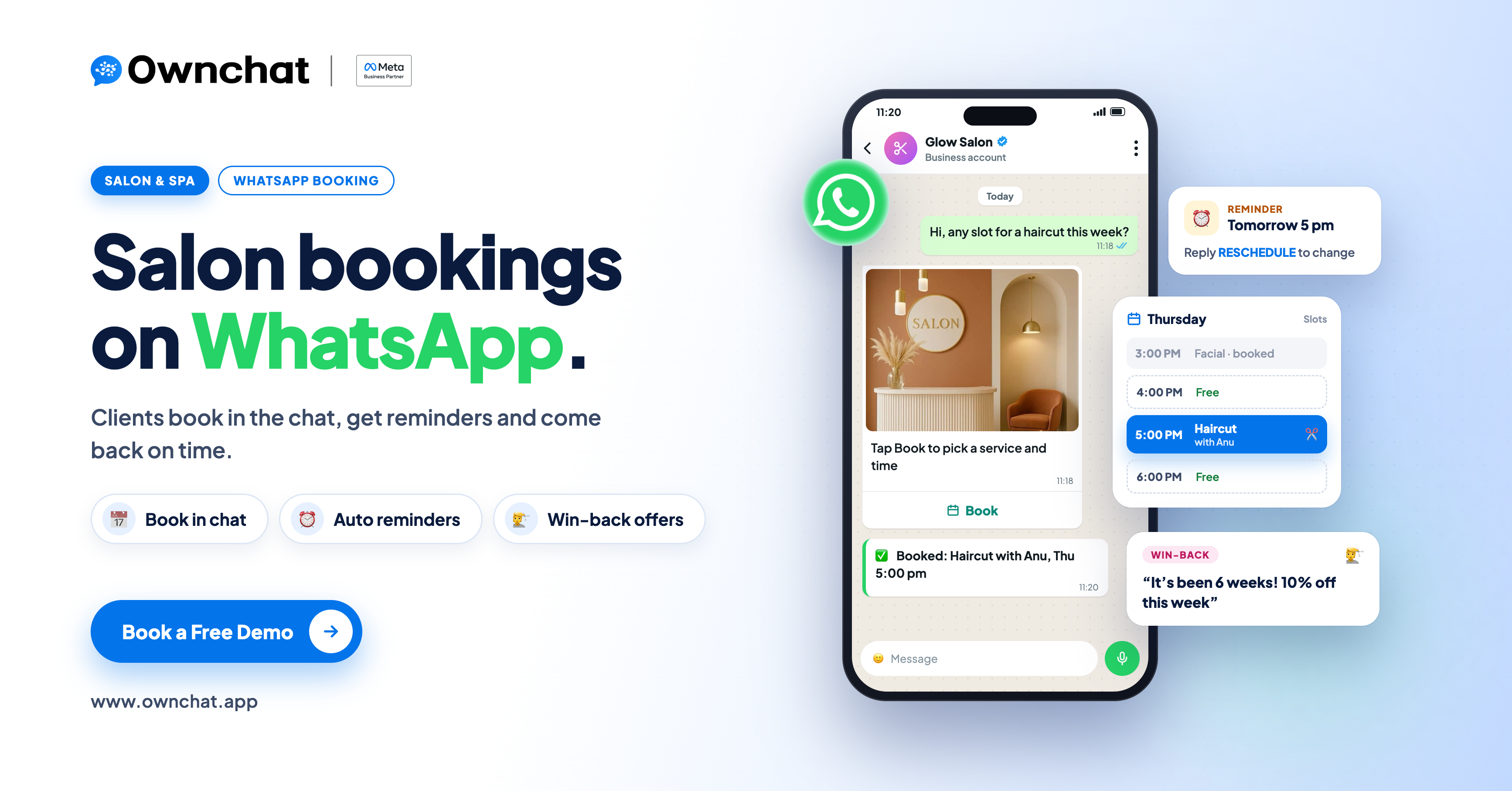
Client: Hi, any slot for a haircut this week? Glow Salon: Hi Divya! Tap Book to pick a service and time 💇♀️ [Divya picks Haircut · Stylist Anu · Thursday 5 pm] Glow Salon: You're booked ✅ Haircut with Anu, Thursday 5:00 pm. See you!
Nobody at the salon was awake. The booking still happened.
Now picture the usual version: the message sits unread till 10 am, Divya books somewhere else at 10:05 pm, and you never know you lost her.
Three Leaks in Every Salon's Day
- Missed bookings. Hands are busy with clients, the phone keeps buzzing, and late-night messages wait till morning.
- No-shows. Clients forget. The chair stays empty and the stylist waits.
- Clients who drift away. They liked you. Nothing reminded them it was time to come back.
What No-Shows Cost
| Per day | Per month (26 days) | |
|---|---|---|
| No-shows | 2 | 52 |
| Average service value | ₹500 | ₹500 |
| Lost revenue | ₹1,000 | **₹26,000** |
| If reminders save half | ₹500 | **₹13,000 back** |
Example only. Use your own numbers.
Ownchat fixes all three on the app your clients already open every day.
1. Clients Book Inside the Chat
When a client messages you, your Ownchat chatbot replies with a Book button. Tapping it opens a short WhatsApp Flow a form inside WhatsApp.
- Service: haircut, facial, hair spa, colour
- Stylist: Anu, Ravi or "anyone available"
- Date and time
- Name (phone number comes from WhatsApp automatically)
No app, no website, no call. Four taps and they're booked, even at 9:40 pm.
No double bookings. The Flow connects to your Zoho Bookings or Calendly calendar, so clients see only the slots that are still free. Once Thursday 5 pm with Anu is booked, it disappears for everyone else. Every booking lands in that calendar, so your reception sees all bookings in one place.
Keep it to four steps. Every extra question loses some clients.

2. Reminders So the Chair Isn't Empty
An Ownchat workflow starts the moment a booking comes in:
| When | Message |
|---|---|
| Right after booking | ✅ *Confirmed: Haircut with Anu, Thu 5:00 pm. Glow Salon, Anna Nagar.* |
| 1 day before | ⏰ *Hi Divya, see you tomorrow at 5 pm! Reply RESCHEDULE to change.* |
| 2 hours before | 📍 *Your haircut is at 5 pm today. Here's our location 📍 (map link)* |
If Divya replies RESCHEDULE, the chat goes to your shared inbox, and your receptionist picks a new slot with her. No calls back and forth.
3. Win Back Clients at the Right Time
Every service has its own cycle. Send the "we miss you" message when the client is actually due, not on a random date.
| Service | Send win-back after |
|---|---|
| Haircut | 5–6 weeks |
| Facial / clean-up | 4 weeks |
| Hair colour / touch-up | 6–8 weeks |
| Hair spa | 4–6 weeks |
In Ownchat, make a segment of clients whose last visit was that long ago, and send them a warm, short message:
Hi Divya, it's been 6 weeks since your haircut with Anu 💇♀️ Book this week and get 10% off. Tap Book to pick a time.
Bringing back a client you already have costs far less than finding a new one. And she already knows Anu.
Before You Start
- Your WhatsApp Business number is connected to Ownchat.
- Your Ownchat plan includes WhatsApp Flows and workflows. Check Ownchat pricing for which plan has them.
- You use Zoho Bookings or Calendly for your appointment calendar. The booking Flow connects to it to show live free slots.
- Reminders and win-back messages need approved templates. You can reply freely for 24 hours after a client messages you. After that, any message you send first must use a template WhatsApp has approved. Create them early.
- Only message clients who agreed to hear from you.
- Keep a human in the loop. Bridal packages, group bookings and complaints should go to your team, not the bot.
Set It Up in 4 Steps
- List your services, prices, durations and stylists.
- Build the booking Flow (service → stylist → time → name), connect it to Zoho Bookings or Calendly for live slots, and add a Book button to your chatbot's welcome message.
- Create 3 templates: confirmation, reminder and win-back. Then build the reminder workflow.
- Test from another phone: book a slot, check it shows in your calendar and disappears from the Flow, check the confirmation, reply RESCHEDULE and see it reach the inbox.
New to Flows? See our WhatsApp Flow examples for ideas.
4 Mistakes Salons Make
- A 10-question booking form. Four steps, done.
- Only one reminder, 1 hour before. Too late to reschedule. Send one a day before.
- Win-back to everyone on the 1st of the month. Send it by service cycle instead.
- No way to reach a person. Some clients want to talk, especially for bridal and group bookings.
Your Monday Checklist
- ☐ How many bookings came through WhatsApp last week?
- ☐ How many no-shows? Did reminders go out?
- ☐ Any unanswered chats in the inbox?
- ☐ Who's due for a win-back this week?
- ☐ Which services are booked most? Put them first in the Flow.
Frequently Asked Questions
Do clients need to download an app?
No. They book inside WhatsApp.
Can clients book at night?
Yes. The booking Flow works 24/7, even when the salon is closed.
Will two clients get the same slot?
No. The booking Flow connects to Zoho Bookings or Calendly and shows only free slots. A slot that's already booked doesn't appear.
Can a team member take over a chat?
Yes. Replies like RESCHEDULE, or any question the bot can't answer, go to your shared inbox.
Do I need approved templates for reminders?
Yes. Any message you send first, like a reminder or win-back, must use a WhatsApp-approved template.
Can the booking form be in Tamil?
You write the form text yourself, so you can write it in Tamil, English or both.
What does it cost?
See Ownchat pricing for plans. WhatsApp charges per delivered template message, such as reminders and win-backs.
Fill Your Appointment Book on WhatsApp
Your clients are already on WhatsApp. Let them book, remember and come back there.