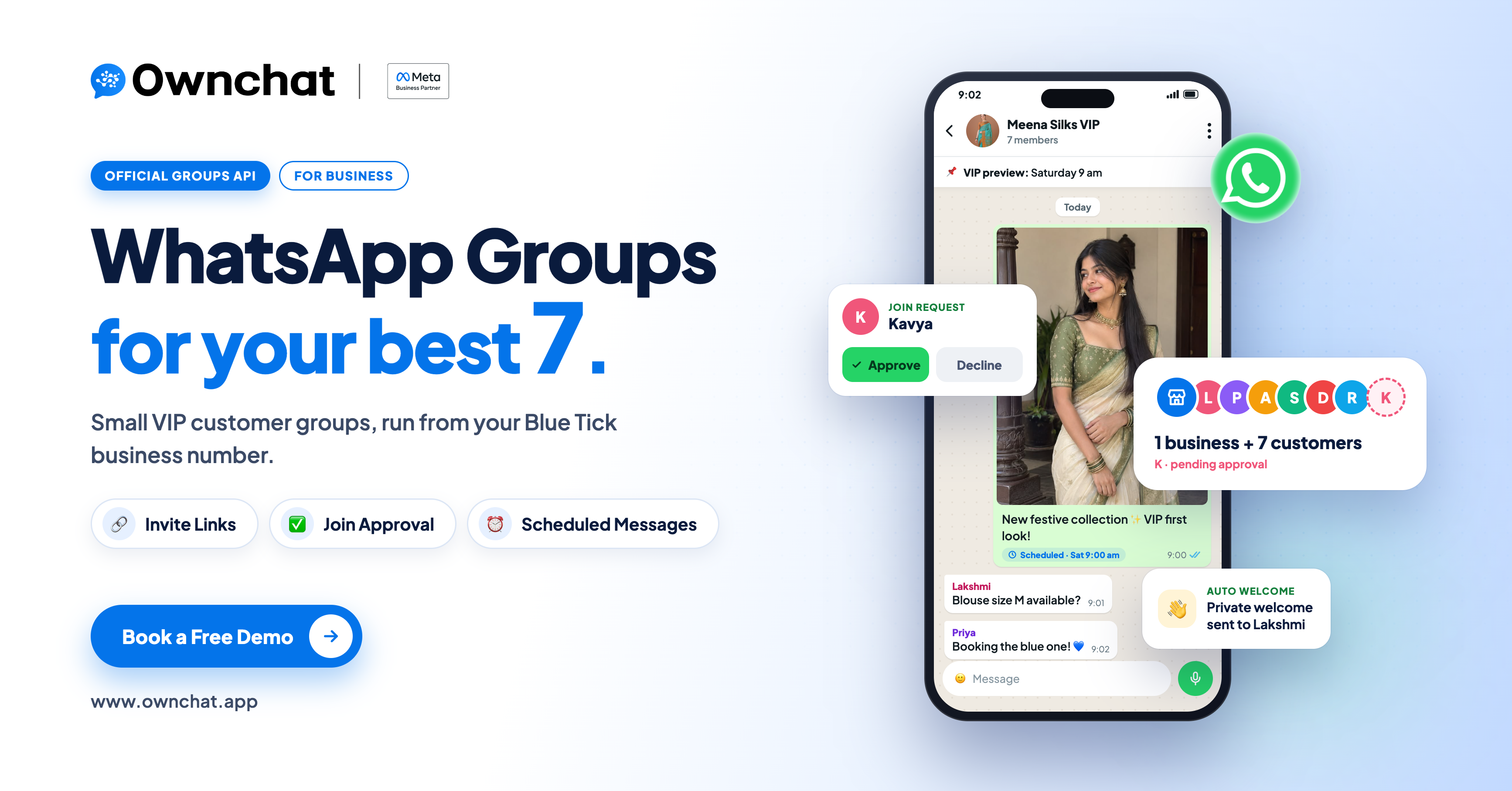
Quick answer: WhatsApp Groups for business let you run small customer groups from your official business number, using Meta's WhatsApp Groups API. With Ownchat, you can create groups from your Blue Tick business number, invite customers with a link, approve who joins, send a private welcome message, pin and schedule announcements, and manage everything from one dashboard. Each group holds up to 8 members: your business number plus 7 customers.
"Can I put all 500 of my customers in one WhatsApp group?"
No. And honestly, you wouldn't want to.
A group of 500 is noise. People mute it in a day. But a group of your 7 best customers, the ones who buy every new collection, book every season or bring their whole family, is different. They see things first, ask questions out loud, and answer each other.
That's what Ownchat WhatsApp Groups are built for: small, private circles run from your business number, not your personal phone.
WhatsApp Group vs Broadcast vs 1:1 Chat: Pick in 10 Seconds
| WhatsApp Group | Broadcast / Campaign | 1:1 Chat | |
|---|---|---|---|
| Size | Up to 8 members (you + 7 customers) | Hundreds or thousands | One customer |
| Who sees replies | Everyone in the group | Only you | Only you |
| Best for | VIP circles, a bridal party, an event committee | Offers and reminders to your whole list | Orders, support, personal questions |
| Feels like | A private club | A personal message | A conversation |
Simple rule: want a few customers to talk together? Group. Want to reach everyone? Broadcast campaign . One customer? Keep it 1:1.
Before You Start: 5 Things to Know
| What it means for you | |
|---|---|
| Blue Tick needed | Your WhatsApp Business number must be Blue Tick verified. Without it, the WhatsApp Group option won't show in Ownchat. |
| 8 members per group | Your business number + up to 7 customers. More customers? Make separate groups by purpose. |
| Charged per customer | A campaign is charged for each customer who receives it, not once per group. |
| Customers join by link | You can't add someone silently. Customers join through your invite link (with your approval, if you turn it on). That keeps every member opted in. |
| 24-hour window | You can send free-form messages only within 24 hours of a customer's last message. After that, use an approved template. |
Charges example: your group has your business number + 7 customers. You send one campaign. That's 7 message charges. Your own number isn't charged.
Also good to know: in a WhatsApp Group, members can see each other's phone numbers. Invite only customers who are happy to be in a group together, and tell them what the group is for.
One Week with a VIP Group: How It Works
Meena runs a saree showroom in Coimbatore. Her festive collection lands on Saturday. Here's how she uses Ownchat that week.
Monday: Create the group
She opens the WhatsApp Group option in Ownchat and creates "Meena Silks VIP" from her Blue Tick business number. One group, one purpose.
Tuesday: Invite, and decide who gets in
She shares the invite link with her 7 top customers. When someone asks to join, she gets a notification and approves the request herself. One customer forwards the link to a friend, so Meena resets the link. The old one stops working.
Wednesday: Every new member gets a personal welcome
As each customer joins, Ownchat sends a private welcome message automatically:
Hi Lakshmi, welcome to the Meena Silks VIP group 🌸 You'll see new collections here 2 days before they reach the store.
Thursday: Pin what matters
She pins store timings and the "VIP preview: Saturday 9 am" note. Ownchat allows up to 3 pinned messages, and the preview pin is set to expire after Saturday, so it doesn't sit there next week.
Friday: Schedule the launch
She writes the launch post with photos and schedules it for Saturday 9 am. No alarm, no rushing.
Saturday: Launch and replies
The post goes out at 9 am. Two customers ask about blouse sizes. Her staff reply from the Ownchat inbox, and everyone in the group sees the answer. Meena has added her store manager as a group admin, so she doesn't have to be on the phone all day.
Later, she sends the same customers an approved campaign template with a festive offer, from the same place she runs her other Ownchat campaigns.
Small Groups That Work
Because a group is small, it works best for your closest customers.
| Business | Group idea |
|---|---|
| Saree and fashion showroom | 7 top customers see new collections first |
| Jewellery showroom | Wedding family group: designs, fittings and delivery date in one place |
| Restaurant or caterer | Event order group with the host family: menu, headcount, timing |
| Salon | Bridal party group: package, trial date and day-of schedule |
| Training centre | Small batch group: class timings, materials, reminders |
| Real estate | Buyer family group: site visit time, documents, updates |
| Travel agency | Tour group: itinerary, pickup time, last-minute changes |
| Gym or studio | Personal training batch: schedule changes and progress tips |
5 Ways to Kill a Group (and What to Do Instead)
- Mixing purposes. VIP offers and event logistics in one group confuse everyone. → One group, one purpose.
- No reason to stay. → Your welcome message should say what members get.
- Old pins. A Diwali offer pinned in December looks careless. → Set pins to expire or replace them.
- Daily forwards. → Post less, but better.
- Using groups for your whole list. → Use broadcasts for everyone else. Keep groups for small circles.
Frequently Asked Questions
What is the WhatsApp Groups API?
It's Meta's official way for businesses to create and run WhatsApp Groups from their business number. Ownchat uses it so you can manage groups from the Ownchat dashboard instead of a personal phone.
How many members can an Ownchat WhatsApp Group have?
Up to 8: your business number plus 7 customers.
Can I add customers to a group directly?
No. Customers join through your invite link, and you can approve each request. Nobody is added without choosing to join.
Do I need Blue Tick verification?
Yes. The WhatsApp Group option appears only when your connected business number is Blue Tick verified.
Can I control who joins?
Yes. Share an invite link, approve join requests yourself, and reset or revoke the link whenever you need to.
How much does a group campaign cost?
Charges are per customer who receives the message, not per group. One campaign to a group with 7 customers counts as 7 messages.
Can I schedule group messages?
Yes. Write announcements in advance and Ownchat sends them at the time you choose.
How many messages can I pin?
Up to 3 per group. Unpin one to pin a new message.
Can I send messages anytime?
Free-form messages work within 24 hours of a customer's last message. After that, use an approved WhatsApp template.
Should I use a group or a broadcast for offers to all my customers?
A broadcast. Groups are for small circles of up to 7 customers. Broadcasts reach your whole customer list, and each customer sees the message as a personal chat.
Start with Your 7 Best Customers
Pick them, create a group, and give them a reason to stay: first look, early offers, quick answers.
Want help setting it up? We'll show you Ownchat WhatsApp Groups on your own number.
Explore the feature: Ownchat WhatsApp Group Management